Plugin Media Wiki Table
Introduced in Tiki3
Use this wiki plugin to display a table using MediaWiki syntax.
Parameters
Display a table using MediaWiki syntaxIntroduced in Tiki 3.
Go to the source code
Preferences required: wikiplugin_mwtable
| Parameters | Accepted Values | Description | Default | Since |
|---|---|---|---|---|
| (body of plugin) | URL | |||
fancy |
(blank) true false |
Set to true to apply additional formatting to the table (header style, odd/even
rows, etc.). Takes precedence over the wiki_classes parameter. |
false | 3.0 |
wiki_classes |
(blank) true false |
Determines whether wiki style classes will be used for the table and cells (used by default) | true | 3.0 |
Usage notes
This plugin doesn't support things like templates or the !row heading syntax. Column styling overcomes the latter to a degree but, for cross-browser consistency, you are limited by HTML to border= , background= , width= and visibility= . You can also use span= so that a col definition can apply to adjacent columns. tr and td styling overrides col .
Structure of data
- Optionally, first line (prior to the first
|) contains html attributes for the table element. - Optionally, next line can specify a caption; line starts with
|+followed by optional html attributes that end with a|followed by the caption text. - Optionally, html attributes for col elements can be specified next on one or more lines starting with a
? - Each column's attributes start on a new line with
?or on the same line preceded by??and become acol - Optionally, column headings can be specified next on one or more lines starting with a
! - Each column's heading starts on a new line with
!or on the same line preceded by!! - Optional html attributes for
thend with a|followed by text that becomes the text of ath - Each row, including the first, starts on a new line with
|-, optionally followed by html attributes for thetrelement - Each cell starts on a new line with
|or on the same line preceded by|| - Optional html attributes for the
tdelement end with a|followed by the cell text (so data for one cell can have 1 or 2 | characters. Any other|characters are assumed to be part of the cell text.)
Examples
Basic syntax:
Copy to clipboard
{MWTABLE(fancy="" wiki_classes="")}data{MWTABLE}
The minimum
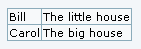
This code:
Copy to clipboard
{MWTABLE()}
|-
| Bill || The little house
|-
| Carol || The big house
{MWTABLE}
Would produce:
Copy to clipboard
<table class="wikitable">
<tr>
<td class="wikicell">Bill</td>
<td class="wikicell">The little house</td>
</tr>
<tr>
<td class="wikicell">Carol</td>
<td class="wikicell">The big house</td>
</tr>
</table>
As a reference, under tikineat.css style, it shows as:
Include styling
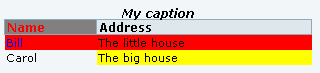
This code:
Copy to clipboard
{MWTABLE( wiki_classes="false")} style="width:50%", class="myclass"
|+style="font-style:italic;"|My caption
? width="30%;" ?? style="background-color:yellow;"
! style="background-color:grey;"| Name
! Address
|- style="background-color: red"
| style="color: blue;" | Bill
| The little house
|-
| Carol || The big house
{MWTABLE}
Would produce:
Copy to clipboard
<table style="width:50%;" class="normal myclass">
<caption style="font-style:italic;">
My caption</caption>
<col style="width:30%;"/>
<col style="background-color:yellow;"/>
<tr>
<th style="background-color:grey;color:red;">Name</th>
<th>Address</th>
</tr>
<tr style="background-color:red;">
<td style="color:blue;">Bill</td>
<td class="">The little house</td>
</tr>
<tr>
<td>Carol</td>
<td>The big house</td>
</tr>
</table>
As a reference, under tikineat.css style, it shows as: