Shoutbox
The Shoutbox is a module that can be placed in either column of Tiki. It serves as an internal Instant Messaging service for the site. Shoutbox is used as a quick informal way for site participants to communicate with each other.
Adding a Shoutbox
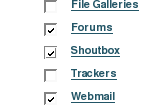
1. Enable the Shoutbox feature on the Administration:Features page by clicking on the checkbox and clicking the "Change Preferences" button at the bottom of the page to save your change.
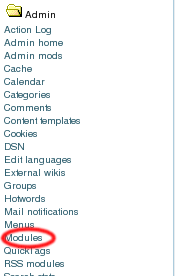
2. Select Module from the Admin Menu.
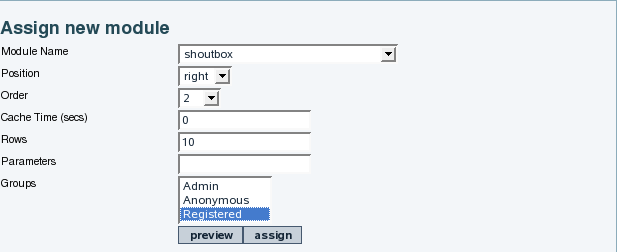
3. Add the Shoutbox module and assign the groups which can use it. In our example, we've limited use to the registered group. We've positioned it as the second item in the right column.
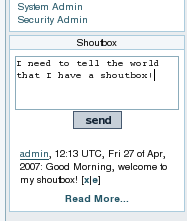
4. Your ShoutBox is now visible!
Configuring the Shoutbox
Changing URL's to links
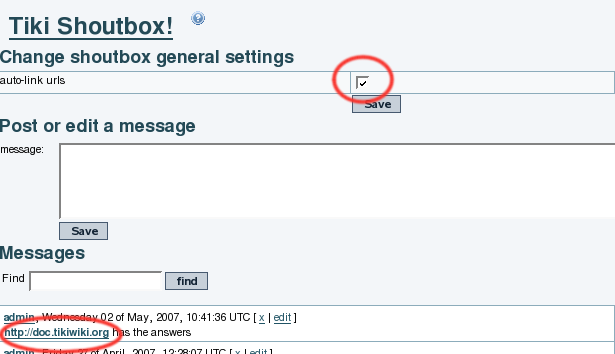
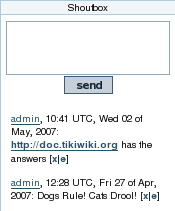
Click the checkbox at the top of the admin page to auto-link URL's. The screenshots below shows the checkbox and the effect when this option is enabled.
Adding Banned Words
If there is certain language you do not want to see in the shoutbox, you can create a list of banned words. Select "Shoutbox Words" from the admin menu:

Then add the words you want to ban. In the example below we're banning some of our least favorite vegetables:
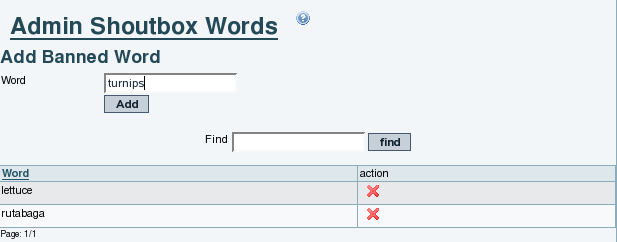
If a user types in one of these words in his shoutbox message, the message will be discarded. It will not be displayed or saved.
These are currently stubs: