Search
- Overview
- Search provides a very useful feature for both Tiki administrators, content providers and users.
- To access
- Click the Search icon on the Admin Panel
or Access http://example.org/tiki-admin.php?page=search
- Child Pages
- This page has the following child pages:
-
- Note
- The following information should be migrated to the Search section of the Tiki User and/or Admin Guides
Search
Overview
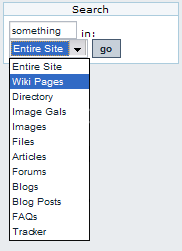
If the search feature is enabled and you assign the search box module to the left or right side bar, you will see a search box where that you can use to search content in Tiki. The search box module will display a select box allowing you to search for something in a specific content :
- Entire site : sum of all fields below
- Wiki Pages : page name, description, data
- Directory : name, description
- Articles : title, heading, body
- File Galleries : name, description
- Files : name, description, search_data (data produced by the converter))
- Forums : forum posts title and content (name and description with tiki search)
- Blogs : title, description (and user with tiki search)
- Blog posts : title, data (and user with tiki search)
- FAQs : title, description
- FAQs questions : question, answer
- Comments : title, data (and summary for tiki search)
Once you select an option and click the search button you will be redirected to the searchresults page :
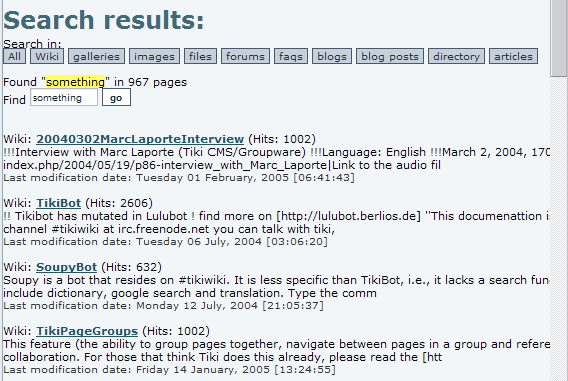
In this screen you will see a list of results for the search. The links below the title can be used to search in different areas of Tiki the same way as the search module does. If there are a lot of results you will see links to the next/prev pages at the bottom. The number of items where the search criteria was found can be located just below the links to search different features.
This integrated search engine is very useful to quick-find content or information in Tiki and it will automatically detect which features/sections are enabled or disabled allowing the search only in enabled features. If the Wiki is disabled, for example, you won't be able to find things in Wiki pages.