Module "menupage"
This module will display the content of any wiki page as a menu in the left or right column or in any other place that a module can be located.
- This type of menu is used as the upper left menu in dev.tiki.org for example.
You can also use this module in the center (main) column.
- See Happy Scroll theme for details.
Parameters
Displays a Wiki page.Required parameters are in
bold.Go to the source code
Preferences required: feature_wiki
| Parameters | Accepted Values | Description | Default | Since |
|---|---|---|---|---|
pagemenu |
pagename | Page to display in the menu. Example value: HomePage. | ||
menu_class |
text | Class of the menu container | ||
menu_id |
text | Id of the menu in the DOM | ||
menu_type |
alpha | Display the page as a menu (horiz / vert) | ||
use_namespace |
int | Prepend the default namespace to the page name for localized menus per workspace (1/0) | 0 |
Usage
On the page Admin > Modules (tiki-admin_modules.php)
- Assign a new module
- Choose the module "menupage" from the drop-down list.
The module will have the same title as the wiki page.
You can assign this "menupage" to any module zone (See Module Admin page if needed, or you can include it within a wiki page, using the PluginModule.
Example
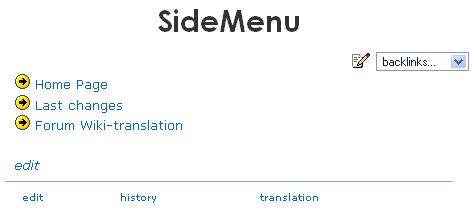
Imagine you have a page called ))SideMenu((, with this content:
(:arrow:) [tiki-index.php|Home Page]
(:arrow:) [tiki-lastchanges.php|Last changes]
(:arrow:) [tiki-view_forum.php?forumId=1|Forum Wiki-translation]

''[tiki-editpage.php?page=SideMenu|edit]''
The wiki page itself looks like this:
Then, the module menupage, like all modules, can be assigned to a group of users.
The assigned module looks like this:
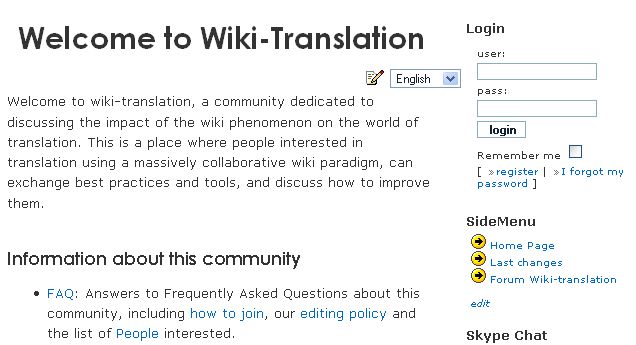
You can see this example live in http://www.wiki-translation.com
For more advanced menus, see "Menu" feature.
Related Pages
See these pages for information that applies for all modules:
- Module — Overall introduction and overview
- Module Admin — Introduction to the module admin pages for site-wide and individual module settings
- Assigning Modules — How to select a module to configure it
- Module Settings Interface — Interface for configuring individual module settings
- Module Settings Parameters — Explanation of standard parameter settings for modules
- Creating Custom Modules — How to create user modules
- Index of Modules — Links to the documentation of individual modules
- User Modules — How (if the feature is active) users can choose and place their modules
- Mods Type Modules — Links to modules that are installed as components
- Menu