PluginJS
Use the JS wiki plugin, introduced in Tiki3, to include JavaScript files or JavaScript code in a wiki page.
Alternatives: PluginHTML or PluginJQ
Parameters
Add JavaScript code or filesIntroduced in Tiki 3.
Go to the source code
Preferences required: wikiplugin_js
| Parameters | Accepted Values | Description | Default | Since |
|---|---|---|---|---|
| (body of plugin) | JavaScript code | |||
file |
url | JavaScript filename | 3.0 | |
lateload |
(blank) y n |
Late load, use headerlib | 9.1 |
Examples
Basic syntax
Insert a javascript file or/and some javascript code.
{JS(file='file.js')}javascript code{JS}
The file.js file is in this case in the Tikiroot.
This will produce the following code for your Tiki site:
<script type="text/javascript" src="file.js"></script>
Note that it has to be surrounded by quotes.
{JS(file="http://example.org/tiki.js")}{JS}
{REMARKSBOX(title="Tip" type="tip")}Literal strings will have < , > , and & converted into HTML entities (and possibly other characters as well), so if your javascript is dealing with HTML (e.g. via document.write() ), you probably need to convert them back.
Example 1
To include JavaScript code, use:
{JS()}
 var....
 function ...
 ...
{JS}
This will produce the following code for your Tiki:
<script type="text/javascript">
var....
function ...
...
</script>
Example 2
This code:
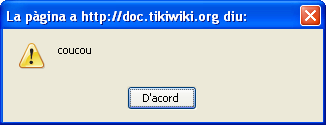
{JS()}alert('coucou'){JS}
Would produce a pop up window that the user would have to click on "Accept" button ("D'accord" in this localized example) to make it disappear: