Morcego 3D network browser is a java applet which was the best way to do this in 2004.Feature was removed. Now, it's time to replace with an HTML5 solution.
Wiki 3D Browser
Wiki3d is a way to view and browse the wiki structure in 3D.
Requires:
- Java installed on local computer
- Enabling those options:
- "XMLRPC API" in Admin > Features > Programmer.
- "Morcego 3D Browser" in Admin > Features > Experimentals.
- "Enable wiki 3D browser:" in Admin > Wiki > Wiki 3D Browser Configuration.
Using the 3D browser
Click on the little bat like icon : 
Then you'll get an image, if you have Java installed, like this:
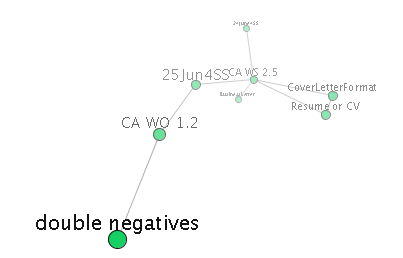
Now you can:
- Drag mouse on an empty space to rotate the graph
- Rotate fast and release, like throwing, to make it keep spinning
- Drag nodes to move them, the graph will balance itself again when you release
- Click nodes to navigate to them
- Click center node to open the node URL in your browser window
Administer the 3d Browser
You can change the settings at: Admin >Wiki>3d
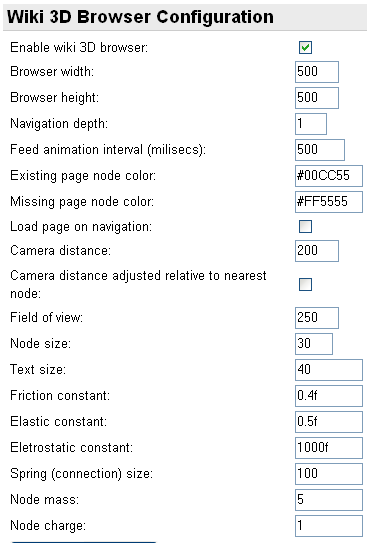
Also ensure the option "XMLRPC API" is enabled in Admin >Freatures.
This feature is only enabled when some themes are chosen, like:
- moreneat.css
- TODO: list up the themes
RFEs
- support for hotwords
- support for indication of external links
- client control of number of levels/depth of visualization
- support for UTF-8 encoded page name
Existing pages and not yet created ones can be displayed in different colors, usually in green and red respectively.
;)