|
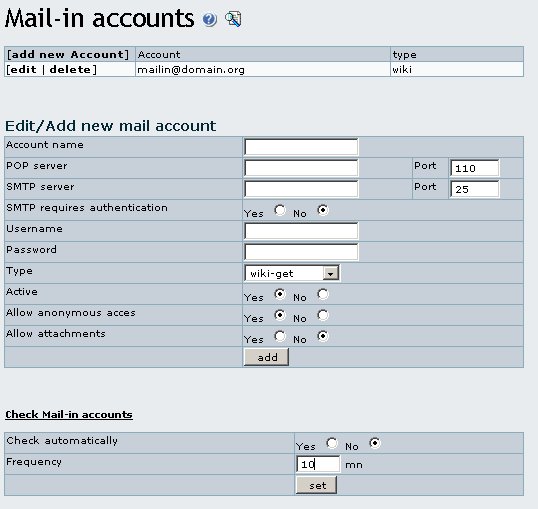
In this screen you can set-up mail accounts indicating the POP3 server, the SMTP server and the user-password to be used, it's like any normal email configuration tool with the addition that you can indicate the type of mail account to set-up. Available types are:
- wiki-get
Emails to this account type allow you to retrieve wiki page contents. The name of the wiki page must be put in the message subject.
- wiki-put
Emails to this account type allow you to replace wiki page contents. The name of the wiki page must be put in the message subject. The original wiki page is replaced by the body of the email.
- wiki-append
Emails to this account type allow you to append data to a wiki page. The name of the wiki page must be put in the message subject. The whole body of the email is appended to the original wiki page. Usage example: change history.
- wiki-prepend
Emails to this account type allow you to prepend data to a wiki page. The name of the wiki page must be put in the message subject. The whole body of the email is added to the top of the original wiki page.
- wiki
Wiki accounts can be used to GET, PUT and APPEND wiki pages, the body of the email is the page content, the subject is used to indicate what to do.
- GET:pagename
- PUT:pagename
- APPEND:pagename
- PREPEND:pagename
- article-put
Emails to this account type allow you to post articles. The title of the article must be put in the message subject. The whole body of the email is being used as article header. The topic and type of the article can be specified at the mail-in account configuration.
|