Using Copyright Management
Use the Copyright feature to automatically include a copyright statement on specific pages, link to a full license page, and add the copyright information when printing.
- Enable and configure the feature on the Copyright Admin page.
- If enabled for Wiki pages:
- Tiki will add the following statement at the bottom of each page, with a link to your License Page:
Copy to clipboard
The content on this page is licensed under the terms of the Copyright License Page
- When editing wiki pages, the following Copyright fields appear:

This allows users submitting content to attach a copyright notice to the page. The user enters the title of work being copyright (which may or may not be different to the page title), the year of copyright and the author(s) associated with the content.
Normal users can only add copyright notices to a page, and only administrators can delete or modify submitted ones. Copyright notices can then be recalled using the Copyright Notice Plugin.
- When printing a page, Tiki will automatically include the full License Page.
- If enabled for Articles:
- If enabled for Blogs:
- If enabled for FAQs:
Editing Copyright Notices
The ©MS uses the permission tiki_p_edit_copyrights which allows users to access the copyrights edit page. To access the copyrights edit page for a particular page, go to the license page for that page and click on the link at the bottom of the page:

If you have permissions this will take you to the copyright edits page where you can edit the copyright notices for that page:
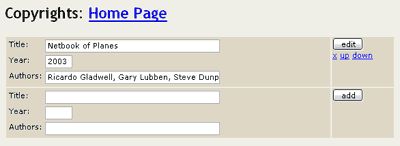
This page allows administrators to alter the order of copyright notices, edit their data or add new copyright notices.
To edit a copyright notice simply alter the information in the text boxes and click the 'edit' button on the right-hand side.
To delete a copyright notice click on the 'x' on the right-hand side.
To move a copyright notice's order click on 'up' or 'down' on the right-hand side.
To add a new copyright notice simply fill in the information in the empty text boxes at the bottom of this page, as you would adding a copyright notice in the wiki edit page above, and click the 'add' button.
Related Topics
Useful Links
To be refactored
[+]
The Copyright Management System (©MS) allows you to specify a content license under which all wiki pages are published when submitted. When this feature is activated by an administrator, new form elements appear on the Wiki Edit Page :

This allows users submitting content to attach a copyright notice to the page. The user enters the title of work being copyright (which may or may not be different to the page title), the year of copyright and the author(s) associated with the content.
Normal users can only add copyright notices to a page, and only administrators can delete or modify submitted ones. Copyright notices can then be recalled using the Copyright Notice Plugin. This is normally only done in the license page. To view the license for a particular page click on the license link at the bottom of the page, for example:

This will take you the the license (in this case the OpenGameLicense) for that page. Depending on how the administrator has set-up the license you may also be able to peruse all the copyright pages for that page as well.
Similarly, clicking on the PrintIcon will now take you to a full print-out of your page content and the license under which it is published.