Apply Profiles tab | |||||||||
|
Related Topics
Apply Profiles tab
In Tiki 1.9, profiles were only active during the installation process. You could not go back and pick a different profile unless you re-installed the database, losing all your changes.
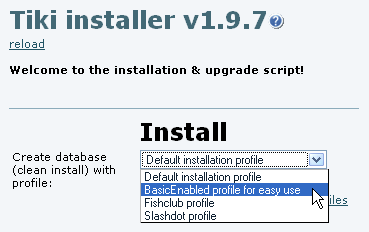
Selection of profile at http://yourdomain/tiki-install.php?lang=XX
| |||||||||
Requirements | |
|
Your php must have the option allow_url_fopen On or must have the library curl installed.
| |
Details of Supported Profiles | |
Tiki 3.x | |
|
In Tiki 1.9, profiles were only active during the installation process. You could not go back and pick a different profile unless you re-installed the database, losing all your changes.
Selection of profile at http://yourdomain/tiki-install.php?lang=XX
| |
Requirements | |
|
Your php must have the option allow_url_fopen On or must have the library curl installed.
| |
Details of Supported Profiles | |
Tiki 3.x | |
|
Until version 2.x, this feature is only active during the installation process. You could not go back and pick a different profile unless you re-installed the database, losing all your changes.
| |