Checking your server & Tiki settings
The information on this page is incomplete and/or outdated. For related info see Tiki Check and System Configuration.
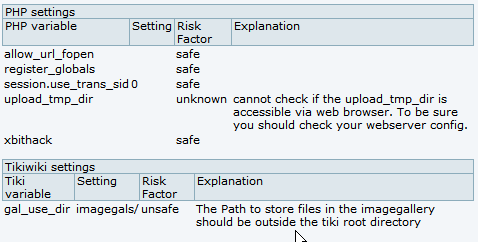
On tiki-admin_security.php, you can check for less secure server or Tiki settings.
Check your files (secdb)
File check (at tiki-admin_security.php) will detect any PHP files (and .tpl files in recent versions of Tiki), but not images (.jpg, .gif, .png) which have been altered compared to the default, clean install of Tiki.
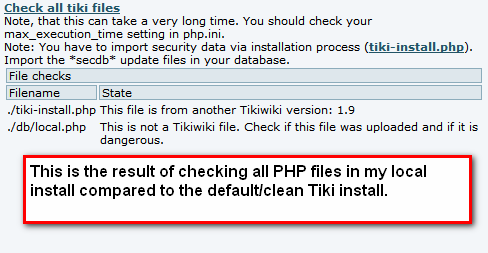
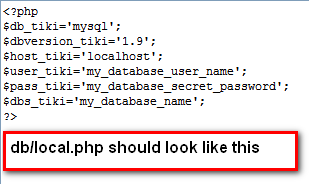
It is normal that local.php be modified. If you check the file:
It is also normal that tiki-install.php be modified (as you probably clicked to de-activate it). All other modified files should have been by you.
Please note that if you update your site via SVN, it's normal that some files are reported because the secDB database is typically only updated at release time.
On more recent versions of Tiki, it's also normal that language files are flagged because they are compressed after the security check is done. This is solved starting in Tiki 9.2
Also, starting in Tiki 9.2, Tiki not only checks .php files but also .tpl, .css, .sql and .js
Robots Exclusion (Banning Search engines)
For some uses you may wish to prevent search engines from crawling, indexing or archiving your site.
See: Robots Exclusion Protocol and Meta Elements
User/Content Security
see: Groups
Securing your webserver
If you are using Apache webserver, you can also secure it (and therefore, secure tiki) by means on enabling "mod_security".
See ModSecurity for more information.
More info:
http://tiki.org/AdminSecurity
;)