Module who_is_there
This module shows a count of current visitors to the site (whether or not logged in) and lists the user names of everyone logged in. If users are allowed to send messages to each other, then an icon appears next to each user name that can be clicked to compose a message to that user (See Inter-User Messages regarding the messaging feature). Clicking on or mousing over the user name brings up information about the user as set up in User Preferences.
Parameters
Display information about users currently logged in.Go to the source code
| Parameters | Accepted Values | Description | Default | Since |
|---|---|---|---|---|
cluster |
If set to "1", separate users based on which host/server they logged on. | |||
content |
Display the number of users logged in, the list of users logged in, or both. Possible values: "count", "list" or "both". Default value: "both" | |||
silent |
If set to "1" hides the module, which allows another "who is there" module to include users that should not see it. |
Screenshots
Below are a couple of screenshots showing the module being used:
|
Module with messaging enabled 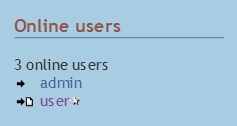
|
Module with messaging disabled 
|
Left or Right Column
The module can be placed in the left or right column through a simple admin interface - see Module Admin for how to do that.
Not working for some users?
Note that if the module is set to only appear for some groups, only users in those groups will show as being online (currently in Tiki 14.x). One way round this limitation is to add another hidden version of the module set to be enabled for all (Registered) users, but to use the Appearance "style" setting to hide it from the others. This is obviously not secure (all online users will be in the page source) but it will stop the second module being visible on the page.
Place the Module on a Page
In the Text Area
This PluginModule code:
{MODULE(module=>who_is_there)}{MODULE}
Produces on this page:
Online Users
Related Pages
- See Module online_users for a similar module
- See these pages for information that applies for all modules
;)