This page needs review
Module switch_lang
This Module allows visitors to change the language of the Tiki site interface (menus, module titles, and so on.). The switch_lang2 module also provides a way to change the interface language.
Parameters
Displays a language picker to change the language of the site.Go to the source code
Preferences required: feature_multilingual, change_language
| Parameters | Accepted Values | Description | Default | Since |
|---|---|---|---|---|
mode |
alpha | Changes how the list of languages is displayed. Possible values are droplist, flags and words. Defaults to droplist. |
Usage
You will see it listed at ""Admin > Modules > Assign new module > Module Name (drop down)" (tiki-admin_modules.php).
You can assign a this Module to a lateral column (See Module Admin page if needed), or you can include it within a wiki page, using the PluginModule.
You can also include the module in a wiki page by using:
Copy to clipboard
{MODULE(module=>switch_lang, title=TITLE, flip=>y|n, nobox=>y|n, decorations=y|n)}{MODULE}
Where:
- title: The title of the module box. The default is Language
- flip:
This option requires that nobox = n. - nobox: If y, do not draw a box around the module. The default is n (a box will be drawn).
This option requires that decorations = y. - decorations: If n, the flip and nobox options will be ignored. The default is y.
The assigned module looks like this:
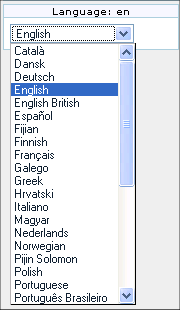
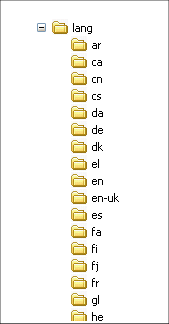
The list of available languages is determined by the language files currently installed in your lang directory:
Related Pages
See these pages for information that applies for all modules:
- Module--Overall introduction and overview
- Module Admin--Introduction to the module admin pages for site-wide and individual module settings
- Assigning Modules--How to select a module to configure it
- Module Settings Interface--Interface for configuring individual module settings
- Module Settings Parameters--Explanation of standard parameter settings for modules
- Creating Custom Modules--How to create user modules
- Index of Modules--Links to the documentation of individual modules
- User Modules--how (if the feature is active) users can choose and place their modules
- Mods Type Modules--links to modules that are installed as components
- i18n
- Switch User
- Module groups_emulation
- Module switch_theme
- http://themes.tiki.org/Template+Tricks#Display_content_conditional_to_current_language
;)